CAMS
TeamCAMS simulates the operation of a Cabin Air Management System (CAMS) of a spacecraft. Study participants, referred to as operators, must monitor several parameters from a control room in order to maintain a survivable atmosphere in the cabin for the crew. The cabin is connected to an oxygen and nitrogen supply; through breathing, the crew produces carbon dioxide, which is disposed of by means of a scrubber. To maintain a comfortable condition the cabin is equipped with both a heater and a cooler as well as a dehumidifier. Finally, a security vent is used to prevent over-pressurization of the cabin.
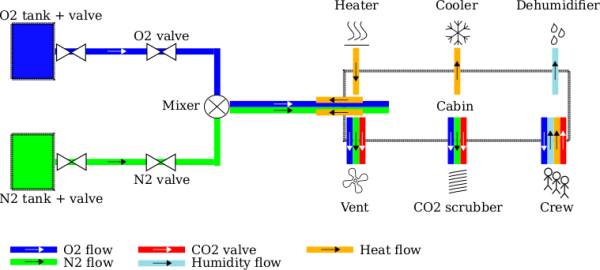
The following picture shows an overview of the system, as well as the flows inside the cabin:
Flows
The atmospheric conditions inside the cabin environment depend on different factors, such as the concentration of oxygen, nitrogen, carbon dioxide, humidity, pressure and temperature. TeamCAMS simulates the interaction between those factors similarly to the AutoCAMS tool:
- the flow of oxygen (blue line in the figure) and nitrogen (green line in figure) enters the cabin and affects both the pressure and the temperature (because gas flowing into the cabin reduces temperature);
- the crew's breathing consumes oxygen and produces carbon dioxide, heat (positive heat flow) and humidity (positive humidity flow);
- the heater increases the temperature in the cabin (positive heat flow);
- the cooler decreases the temperature in the cabin (negative heat flow);
- the CO2 scrubber removes carbon dioxide from the cabin, as well as some oxygen and nitrogen;
- the vent removes an equal amount of oxygen, nitrogen and carbon dioxide and decreases the cabin's pressure;
- the dehumidifier removes humidity from the cabin (negative humidity flow).
Automatic Control
The cabin is equipped with an automatic control system which uses sensors to toggle devices and valves on and off.