Table of Contents
Quick Start Guide
The TeamCAMS Log Processor allows researchers to automatically extract and transform data from TeamCAMS session logs. Processing a set of log files typically requires only four simple steps.
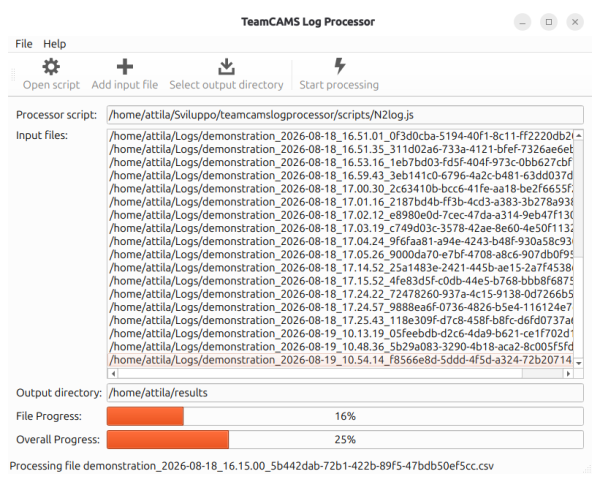
Step 1: Select a Processing Script
Click Open script and choose a JavaScript processing script (.js).
The selected script defines how the log data will be analyzed and which output files will be generated. TeamCAMS includes several example scripts that extract common performance measures such as:
- Transmission Check response times
- N₂ Logging task performance
- Communication statistics
- Fault management metrics
Researchers can also create their own custom scripts to generate datasets tailored to a specific study. Further details can be found in the Script Development section.
Step 2: Add Input Log Files
Click Add input file and select one or more TeamCAMS log files.
Input files are the CSV session logs generated by the TeamCAMS Manager. Multiple files can be selected and processed in a single operation, making it possible to analyze complete studies involving dozens or hundreds of experimental sessions.
The selected files will be displayed in the Input files list.
Step 3: Select an Output Directory
Click Select output directory and choose the folder where the generated results should be saved.
All output files created by the processing script will be written to this directory. Depending on the script, one or more CSV files may be generated for each processed session.
Step 4: Start Processing
Once the script, input files, and output directory have been selected, click Start processing.
The Log Processor will:
- Load the selected processing script.
- Process each input file sequentially.
- Read every event contained in the session logs.
- Execute the script logic.
- Generate the output datasets.
During processing, the application displays:
- File Progress – Progress within the currently processed file.
- Overall Progress – Progress across all selected files.
- Current File – The file currently being processed.
Error Handling
If the Log Processor encounters a corrupted log file, invalid CSV data, or an unexpected file format, an error dialog will be displayed describing the problem.
After acknowledging the message, processing continues with the remaining files whenever possible. This allows large batches of session logs to be processed without restarting the operation, even when individual files contain errors or incomplete data.
Typical causes of errors include:
- Damaged or truncated CSV files.
- Files that were not generated by TeamCAMS.
- Unexpected column counts.
- Errors in custom processing scripts.
- Invalid JSON data contained in log events.
When script-related errors occur, the dialog will also indicate the line number where the problem was detected, making it easier to debug custom processing scripts.
Typical Workflow
A typical analysis workflow is:
- Export session logs from TeamCAMS Manager.
- Open the Log Processor.
- Select an appropriate processing script.
- Add all session CSV files.
- Choose an output directory.
- Start processing.
- Import the generated datasets into statistical software such as R, SPSS, Jamovi, JASP, MATLAB, Python, or Excel for further analysis.
This workflow significantly reduces the effort required to prepare experimental data while ensuring that all sessions are processed consistently and reproducibly.